Hashtables
What is a Hashtable?
- Hash - A hash is the result of some algorithm taking an incoming string and converting it into a value that could be used for either security or some other purpose. In the case of a hashtable, it is used to determine the index of the array.
- Buckets - A bucket is what is contained in each index of the array of the hashtable. Each index is a bucket. An index could potentially contain multiple key/value pairs if a collision occurs.
- Collisions - A collision is what happens when more than one key gets hashed to the same location of the hashtable
Why do we use them?
- Hold unique values
- Dictionary
- Library
What Are they?
-
Hashtables are a data structure that utilize key value pairs. This means every
NodeorBuckethas both a key, and a value. -
The basic idea of a hashtable is the ability to store the key into this data structure, and quickly retrieve the value. This is done through what we call a hash. A hash is the ability to encode the key that will eventually map to a specific location in the data structure that we can look at directly to retrieve the value.
-
Since we are able to hash our key and determine the exact location where our value is stored, we can do a lookup in an O(1) time complexity. This is ideal when quick lookups are required.
Structure
Hashing
- a hash code turns a key into an integer. It’s very important that hash codes are deterministic: their output is determined only by their input. Hash codes should never have randomness to them. The same key should always produce the same hash code
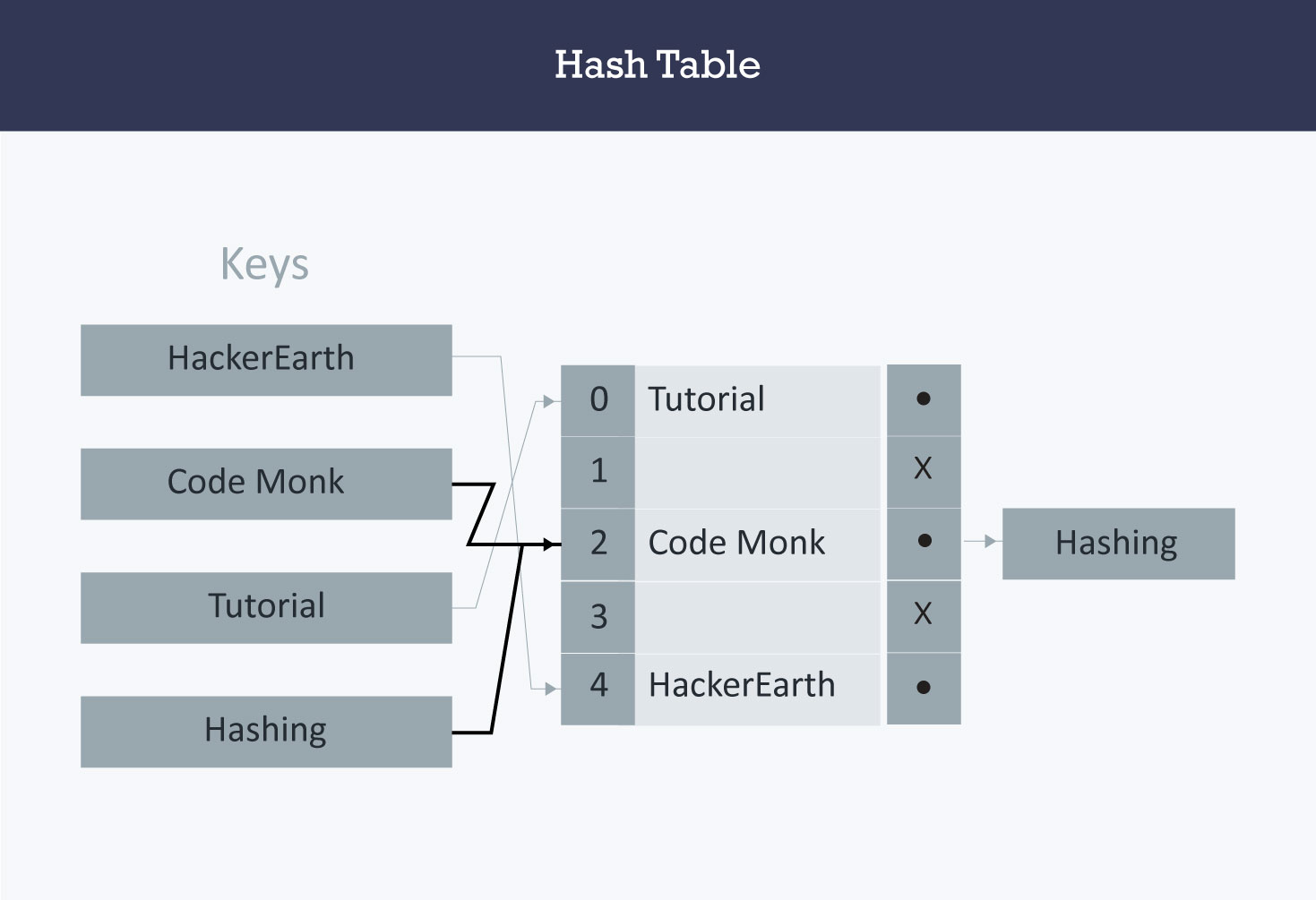
Creating a Hash
-
A hashtable traditionally is created from an array. I always like the size 1024. this is important for index placement. After you have created your array of the appropriate size, do some sort of logic to turn that “key” into a numeric number value. Here is a possible suggestion:
-
Add or multiply all the ASCII values together. Multiply it by a prime number such as 599. Use modulo to get the remainder of the result, when divided by the total size of the array. Insert into the array at that index
  Key = "Cat"
  Value = "Josie"

  67 + 97 + 116 = 280

  280 * 599 = 69648

  69648 % 1024 = 16

  Key gets placed in index of 16.
Collisions
A collision occurs when more than one key hashes to the same index in an array. As mentioned earlier, a “perfect hash” will never have any collisions. To put this into perspective, the worst possible hash is one that hashes every single key to the same exact index of an array. The more keys you have hashed to a specific index, the more key/value pair combos you can potentially have.
-
If two keys ever ultimately resolved to the same index, then two calls to .Add(key, val) with different keys would overwrite each other
-
Collisions are solved by changing the initial state of the buckets. Instead of starting them all as
nullwe can initialize aLinkedListin each one! Now if two keys resolve to the same index in the array then their key/value pairs can be stored as a node in a linked list. Each index in the array is called a “bucket” because it can store multiple key/value pairs.
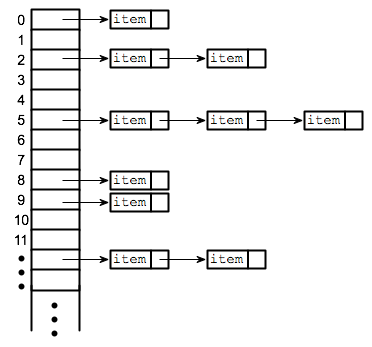
-
example
hashMap.Add("Pioneer Square", 98104); hashMap.Add("Alki Beach", 98116); Bucket 92: [{Pioneer Square: 98104} --> {Alki Beach: 98116}] -
Hash maps do this to store values:
- accept a key
- calculate the hash of the key
- use modulus to convert the hash into an array index
- store the key with the value by appending both to the end of a linked list
-
Hash maps do this to read value:
- accept a key
- calculate the hash of the key
- use modulus to convert the hash into an array index
- use the array index to access the short LinkedList representing a bucket
- search through the bucket looking for a node with a key/value pair that matches the key you were given
-
Hashmap Example:
SUM HASHED: Pioneer Square = 1379 SUM HASHED: Alki Beach = 884 SUM HASHED: U District = 955 BUCKET SIZE=99 SUM INDEX: 1379 % 99 = 92 SUM INDEX: 884 % 99 = 92 SUM INDEX: 995 % 99 = 64 -
Calculating hashes and indexes by multiplying the ascii values of each character:
  MULT HASHED: Pioneer Square = 599126016
  MULT HASHED: Alki Beach = 1062823936
  MULT HASHED: U District = 578867200

  BUCKET SIZE=99
  MULT INDEX:  599126016 % 99 = 93
  MULT INDEX: 1062823936 % 99 = 31
  MULT INDEX:  578867200 % 99 = 43
Bucket Sizes
-
Hash Maps can have any number of buckets. If a hash map has only a few buckets it will be densely full and have many collisions. If a hash map has more buckets it will be more sparsely populated, there will be less collisions, but there may be a lot of extra empty space.
-
It’s possible to compute the “load factor” of a hash table. The load factor tells us something about how full the hash table is. A hash table can start with only a few buckets, calculate it’s own load factor, recognize when it gets too full and automatically grow and add more buckets to itself to accommodate more data.
Internal Methods
-
Add()When adding a new key/value pair to a hashtable:- send the key to the GetHash method.
- Once you determine the index of where it should be placed, go to that index
- Check if something exists at that index already, if it doesn’t, add it with the key/value pair.
- If something does exist, add the new key/value pair to the data structure within that bucket.
Find()- The Find takes in a key, gets the Hash, and goes to the index location specified. Once at the index location is found in the array, it is then the responsibility of the algorithm the iterate through the bucket and see if the key exists and return the value.
Contains()- The Contains method will accept a key, and return a bool on if that key exists inside the hashtable. The best way to do this is to have the contains call the GetHash and check the hashtable if the key exists in the table given the index returned.
- ` GetHash()`
- The GetHash will accept a key as a string, conduct the hash, and then return the index of the array where the key/value should be placed.