S3
What is Amazon S3?
Amazon Simple Storage Service (Amazon S3) is an object storage service that offers industry-leading scalability, data availability, security, and performance. Customers of all sizes and industries can use Amazon S3 to store and protect any amount of data for a range of use cases, such as data lakes, websites, mobile applications, backup and restore, archive, enterprise applications, IoT devices, and big data analytics. Amazon S3 provides management features so that you can optimize, organize, and configure access to your data to meet your specific business, organizational, and compliance requirements.
Features of Amazon S3
-
Storage classes
- Amazon S3 offers a range of storage classes designed for different use cases. For example, you can store mission-critical production data in S3 Standard for frequent access, save costs by storing infrequently accessed data in S3 Standard-IA or S3 One Zone-IA, and archive data at the lowest costs in S3 Glacier and S3 Glacier Deep Archive.
-
Storage management
-
Amazon S3 has storage management features that you can use to manage costs, meet regulatory requirements, reduce latency, and save multiple distinct copies of your data for compliance requirements.
-
S3 Lifecycle – Configure a lifecycle policy to manage your objects and store them cost effectively throughout their lifecycle. You can transition objects to other S3 storage classes or expire objects that reach the end of their lifetimes.
-
S3 Object Lock – Prevent Amazon S3 objects from being deleted or overwritten for a fixed amount of time or indefinitely. You can use Object Lock to help meet regulatory requirements that require write-once-read-many (WORM) storage or to simply add another layer of protection against object changes and deletions.
-
S3 Replication – Replicate objects and their respective metadata and object tags to one or more destination buckets in the same or different AWS Regions for reduced latency, compliance, security, and other use cases.
-
S3 Batch Operations – Manage billions of objects at scale with a single S3 API request or a few clicks in the Amazon S3 console. You can use Batch Operations to perform operations such as Copy, Invoke AWS Lambda function, and Restore on millions or billions of objects.
-
-
-
Access management
-
Amazon S3 provides features for auditing and managing access to your buckets and objects. By default, S3 buckets and the objects in them are private. You have access only to the S3 resources that you create. To grant granular resource permissions that support your specific use case or to audit the permissions of your Amazon S3 resources, you can use the following features.
-
S3 Block Public Access – Block public access to S3 buckets and objects. By default, Block Public Access settings are turned on at the account and bucket level.
-
AWS Identity and Access Management (IAM) – Create IAM users for your AWS account to manage access to your Amazon S3 resources. For example, you can use IAM with Amazon S3 to control the type of access a user or group of users has to an S3 bucket that your AWS account owns.
-
Bucket policies – Use IAM-based policy language to configure resource-based permissions for your S3 buckets and the objects in them.
-
Access control lists (ACLs) – Grant read and write permissions for individual buckets and objects to authorized users. As a general rule, we recommend using S3 resource-based policies (bucket policies and access point policies) or IAM policies for access control instead of ACLs. ACLs are an access control mechanism that predates resource-based policies and IAM. For more information about when you’d use ACLs instead of resource-based policies or IAM policies, see Access policy guidelines.
-
Access Analyzer for S3 – Evaluate and monitor your S3 bucket access policies, ensuring that the policies provide only the intended access to your S3 resources.
-
-
-
Data processing
-
To transform data and trigger workflows to automate a variety of other processing activities at scale, you can use the following features.
-
S3 Object Lambda – Add your own code to S3 GET requests to modify and process data as it is returned to an application. Filter rows, dynamically resize images, redact confidential data, and much more.
-
Event notifications – Trigger workflows that use Amazon Simple Notification Service (Amazon SNS), Amazon Simple Queue Service (Amazon SQS), and AWS Lambda when a change is made to your S3 resources.
-
-
-
Storage logging and monitoring
-
Automated monitoring tools
-
Amazon CloudWatch metrics for Amazon S3 – Track the operational health of your S3 resources and configure billing alerts when estimated charges reach a user-defined threshold.
-
AWS CloudTrail – Record actions taken by a user, a role, or an AWS service in Amazon S3. CloudTrail logs provide you with detailed API tracking for S3 bucket-level and object-level operations.
-
-
Manual monitoring tools
-
Server access logging – Get detailed records for the requests that are made to a bucket. You can use server access logs for many use cases, such as conducting security and access audits, learning about your customer base, and understanding your Amazon S3 bill.
-
AWS Trusted Advisor – Evaluate your account by using AWS best practice checks to identify ways to optimize your AWS infrastructure, improve security and performance, reduce costs, and monitor service quotas. You can then follow the recommendations to optimize your services and resources.
-
-
-
Analytics and insights
-
Amazon S3 offers features to help you gain visibility into your storage usage, which empowers you to better understand, analyze, and optimize your storage at scale.
-
Amazon S3 Storage Lens – Understand, analyze, and optimize your storage. S3 Storage Lens provides 29+ usage and activity metrics and interactive dashboards to aggregate data for your entire organization, specific accounts, AWS Regions, buckets, or prefixes.
-
Storage Class Analysis – Analyze storage access patterns to decide when it’s time to move data to a more cost-effective storage class.
-
S3 Inventory with Inventory reports – Audit and report on objects and their corresponding metadata and configure other Amazon S3 features to take action in Inventory reports. For example, you can report on the replication and encryption status of your objects. For a list of all the metadata available for each object in Inventory reports
-
-
-
Strong consistency
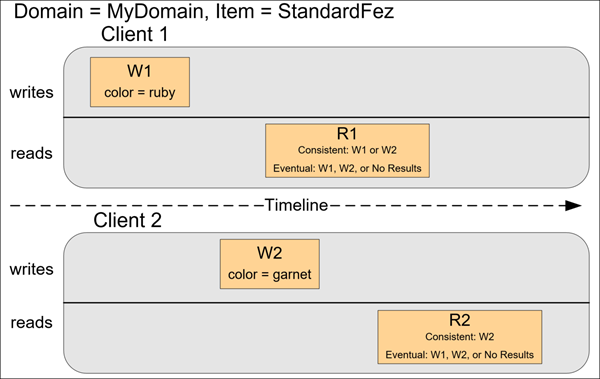
- Amazon S3 provides strong read-after-write consistency for PUT and DELETE requests of objects in your Amazon S3 bucket in all AWS Regions. This behavior applies to both writes of new objects as well as PUT requests that overwrite existing objects and DELETE requests.
How Amazon S3 works
-
Buckets
-
A bucket is a container for objects stored in Amazon S3. You can store any number of objects in a bucket and can have up to 100 buckets in your account.
-
Buckets also:
-
Organize the Amazon S3 namespace at the highest level.
-
Identify the account responsible for storage and data transfer charges.
-
Provide access control options, such as bucket policies, access control lists (ACLs), and S3 Access Points, that you can use to manage access to your Amazon S3 resources.
-
Serve as the unit of aggregation for usage reporting.
-
-
-
Objects
- Objects are the fundamental entities stored in Amazon S3. Objects consist of object data and metadata. The metadata is a set of name-value pairs that describe the object.
- An object is uniquely identified within a bucket by a key (name) and a version ID (if S3 Versioning is enabled on the bucket).
-
Keys
- An object key (or key name) is the unique identifier for an object within a bucket. Every object in a bucket has exactly one key. The combination of a bucket, object key, and optionally, version ID (if S3 Versioning is enabled for the bucket) uniquely identify each object. So you can think of Amazon S3 as a basic data map between “bucket + key + version” and the object itself.
-
S3 Versioning
- You can use S3 Versioning to keep multiple variants of an object in the same bucket. With S3 Versioning, you can preserve, retrieve, and restore every version of every object stored in your buckets.
-
Version ID
- When you enable S3 Versioning in a bucket, Amazon S3 generates a unique version ID for each object added to the bucket. Objects that already existed in the bucket at the time that you enable versioning have a version ID of null.
-
Bucket policy
- A bucket policy is a resource-based AWS Identity and Access Management (IAM) policy that you can use to grant access permissions to your bucket and the objects in it. Only the bucket owner can associate a policy with a bucket. The permissions attached to the bucket apply to all of the objects in the bucket that are owned by the bucket owner. Bucket policies are limited to 20 KB in size.
-
Access control lists (ACLs)
- As a general rule, we recommend using S3 resource-based policies (bucket policies and access point policies) or IAM policies for access control instead of ACLs. ACLs are an access control mechanism that predates resource-based policies and IAM.
-
S3 Access Points
- Amazon S3 Access Points are named network endpoints with dedicated access policies that describe how data can be accessed using that endpoint. Access Points simplify managing data access at scale for shared datasets in Amazon S3.
Amazon S3 data consistency model
Accessing Amazon S3
-
AWS Management Console
- The console is a web-based user interface for managing Amazon S3 and AWS resources. If you’ve signed up for an AWS account, you can access the Amazon S3 console by signing into the AWS Management Console and choosing S3 from the AWS Management Console home page.
-
AWS Command Line Interface
- You can use the AWS command line tools to issue commands or build scripts at your system’s command line to perform AWS (including S3) tasks.
-
AWS SDKs
- AWS provides SDKs (software development kits) that consist of libraries and sample code for various programming languages and platforms (Java, Python, Ruby, .NET, iOS, Android, and so on). The AWS SDKs provide a convenient way to create programmatic access to S3 and AWS. Amazon S3 is a REST service. You can send requests to Amazon S3 using the AWS SDK libraries. which wrap the underlying Amazon S3 REST API and simplify your programming tasks. For example, the SDKs take care of tasks such as calculating signatures, cryptographically signing requests, managing errors, and retrying requests automatically.
-
Amazon S3 REST API
- The architecture of Amazon S3 is designed to be programming language-neutral, using AWS-supported interfaces to store and retrieve objects. You can access S3 and AWS programmatically by using the Amazon S3 REST API. The REST API is an HTTP interface to Amazon S3. With the REST API, you use standard HTTP requests to create, fetch, and delete buckets and objects.
-
To learn S3 with Amplify follow this tutorial
- (https://docs.amplify.aws/lib/storage/getting-started/q/platform/android/#goal)