Java Basics
-
Language Basics
-
1- Variables
-
The Java programming language defines the following kinds of variables:
- 1- Instance Variables (Non-Static Fields) Technically speaking, objects store their individual states in “non-static fields”, that is, fields declared without the static keyword.
- 2- Class Variables (Static Fields) A class variable is any field declared with the static modifier; this tells the compiler that there is exactly one copy of this variable in existence, regardless of how many times the class has been instantiated.
- 3- Local Variables Similar to how an object stores its state in fields, a method will often store its temporary state in local variables.
- 4- Parameters You’ve already seen examples of parameters, both in the Bicycle class and in the main method of the “Hello World!” application. Recall that the signature for the main method is public static void main(String[] args).
-
Java Variable Naming Conventions
-
There are a few rules and conventions related to the naming of variables.
- 1- Java variable names are case sensitive. The variable name money is not the same as Money or MONEY.
- 2 - Java variable names must start with a letter, or the $ or _ character.
- 3- After the first character in a Java variable name, the name can also contain numbers (in addition to letters, the $, and the _ character).
- 4- Variable names cannot be equal to reserved key words in Java. For instance, the words int or for are reserved words in Java. Therefore you cannot name your variables int or for.
-
Operators

-
Expressions, Statements, and Blocks
-
An expression is a construct made up of variables, operators, and method invocations, which are constructed according to the syntax of the language, that evaluates to a single value. You’ve already seen examples of expressions, illustrated in bold below:
- int cadence = 0;
- anArray[0] = 100;
-
System.out.println(“Element 1 at index 0: “ + anArray[0]);
- int result = 1 + 2; // result is now 3
- if (value1 == value2) System.out.println(“value1 == value2”);
-
Statements are roughly equivalent to sentences in natural languages. A statement forms a complete unit of execution. The following types of expressions can be made into a statement by terminating the expression with a semicolon ( ; ).
- Assignment expressions : aValue = 8933.234;
- Any use of ++ or – : aValue++;
- Method invocations : System.out.println(“Hello World!”);
- Object creation expressions : Bicycle myBike = new Bicycle();
-
A block is a group of zero or more statements between balanced braces {} and can be used anywhere a single statement is allowed.
-
-
Control Flow Statements
The statements inside your source files are generally executed from top to bottom, in the order that they appear. Control flow statements, however, break up the flow of execution by employing decision making, looping, and branching, enabling your program to conditionally execute particular blocks of code. This section describes the decision-making statements (if-then, if-then-else, switch), the looping statements (for, while, do-while), and the branching statements (break, continue, return) supported by the Java programming language.
-
-
What does it mean to compile code?
- Compiling is the process of transforming a high level language into a low level langauge. A high level langauge is closer to English. A low level language is closer to what the computer understands.
-
XKCD Compiling
-
Conversion from the more conveniently human-writable code into computer-executable files is performed by assemblers, interpreters, or compilers.
- Programs can be written in assembly code, which is basically just a set of mnemonics that make machine code much easier for a human to remember and correctly parse; the human-written assembly code is then run through a simple assembler to convert it directly into machine code.
- Interpreters (e.g. that for PHP for one example) generally read through the code, or script, each line at a time as and when required, and has to do a lot of work with various processing overheads and the risk of hitting an invalid instruction or mistake in syntax that it can’t handle. It also requires that a relevant version of the interpreter exist on any machine that has to run the script and perhaps some additional knowledge by the end-user.
- For widely distributed (and especially commercial) programs, some form of compilation will instead be used. Compiling may have just one computer system read through the man-written code and (barring errors) produces the equivalent stand-alone and direct machine-readable code, suitable for a given range of computers. This process might involve several passes to check for ‘obvious’ errors in the code, as well as converting some programming concepts that are easiest for humans to understand into equivalent concepts that may be far easier for the computer to work with. As such, compiling takes a certain amount of time at the time of production. Normally, this takes a few seconds, but, depending on the size of the project and the power of the computer doing the compilation, the time required to compile a program may measure in minutes, or even hours.

-
-
Making Sense of Java’s API Documentation
-
Searching for a term
What follows describes two ways to look up the System.out.println method.
-
1- Using the index
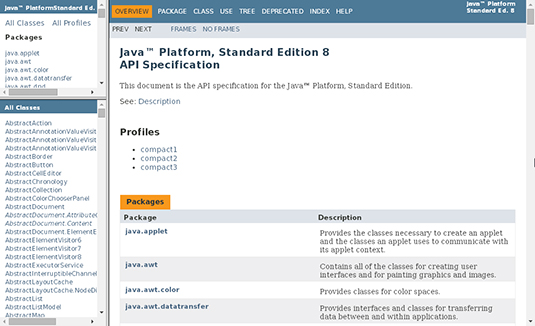
- 1- Visit docs.oracle.com/javase/8/docs/api/.
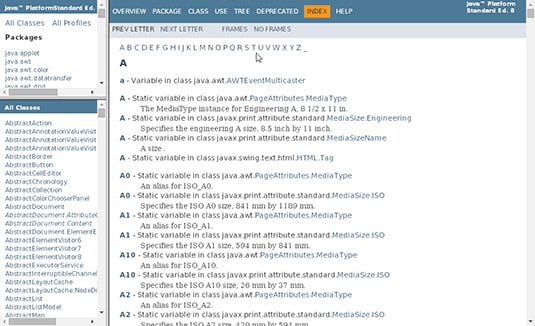
- 2- Click the INDEX link at the top of the page to open the index, as shown in Figure
 A list of letters is near the top of the index as follwing figure
-
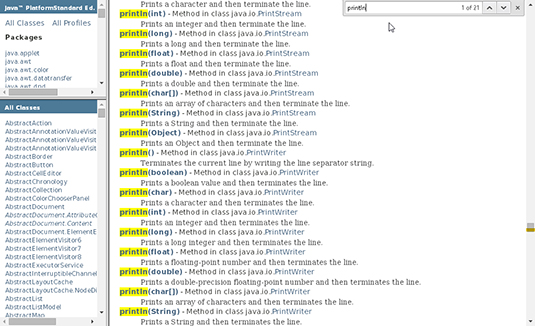
3- In the P section, do a search for println to find the println entries.Most web browsers enable you to search for something like println in the text of a page. Here’s how:
-
3.1 - Make sure the browser knows that you want to search in the big frame that takes up most of the page (and not in the smaller frames on the left side of the page). To do this, click your mouse inside the big frame. (Don’t click a link. Click on some neutral white area of the frame.)
-
3.2 - Open the browser’s Find dialog box. On most Windows browsers, pressing Ctrl+F coaxes the Find dialog box out of hiding. On a Mac, clicking Command+F does the trick.
-
3.3 - When you see the Find dialog box, type println in the text box and click the box’s Find or Find Next button
-
-
4- Pick one of the println entries.
The P section has a big boatload of println entries, as shown in follwing Figure, below. The entries differ from one another in two ways:
-
Each entry says println(int), println(String), or println(someOtherTypeName). The type name can differ from one entry to another.
-
Each entry says that println is a method in class java.someStuff.someMoreStuff. The class can differ from one entry to another.
-
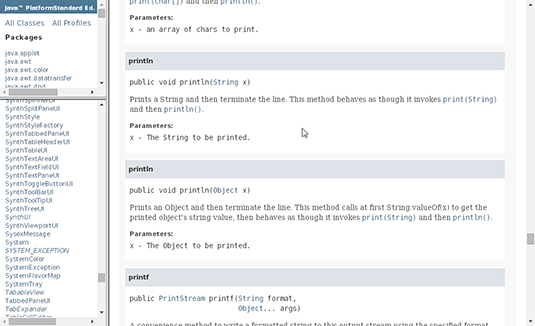
- 5- Click the link for the entry that you’ve chosen.
-
2 - Using the list of classes
- 1 - Visit docs.oracle.com/javase/8/docs/api/.
- 2- Find the page that documents the System class
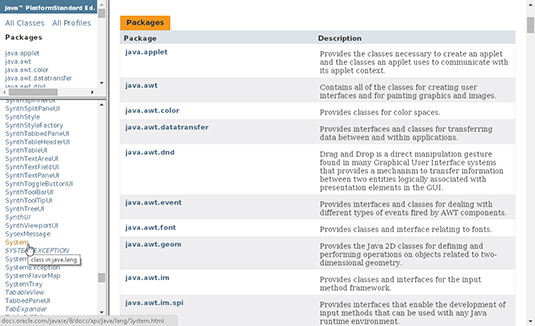
- 3- On the documentation page for the System class, find the out variable
- 4- In the table’s out row, click the PrintStream link.
- 5- On the documentation page for PrintStream, find println(String).
-